Canvas Envision Document Items
Canvas Envision Creator is a web-based editor of Envision documents. An Envision document is a file of the proprietary .evdoc file type that consists of various items: pages, page layers, 3D CAD models, 3D animations, 2D shapes, images, videos, text objects, and more. Each item is an instance of a given item type. The evCreate API provides the contracts for such item types and functions to manipulate such items.
Document hierarchy
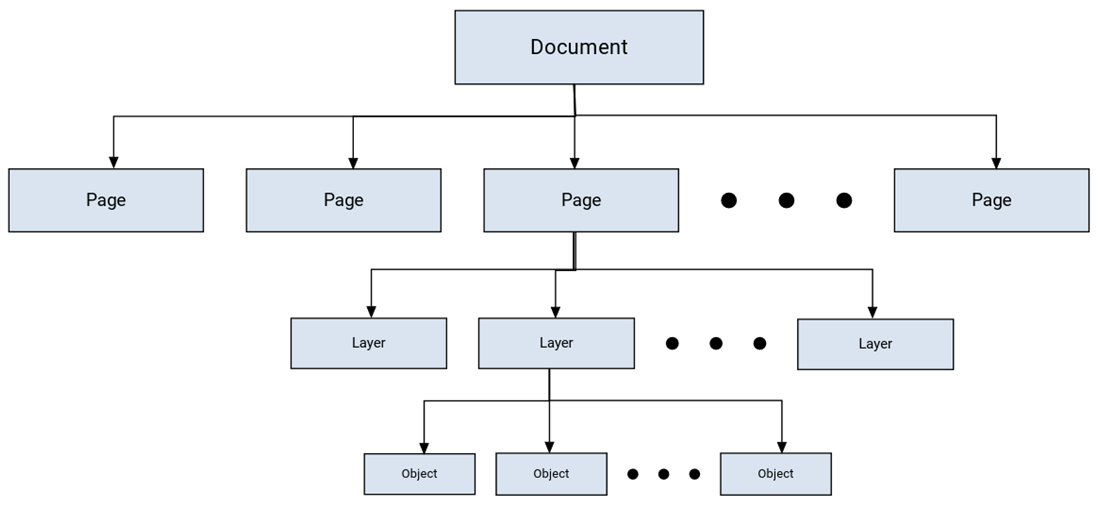
An Envision document organizes its items in the following hierarchical structure:
Document:
Page:
Layer:
Object
The evCreate API sections reflect this hierarchy.
Envision item object blueprint
Technically, items in Envision documents are JavaScript (JS) objects whose blueprints are defined in the TypeScript (TS) source code.
EvItem interface
The EvItem TS interface defines a blueprint of a JS object representing an evdoc item in code. An item object includes an item type identifier and an item data object.
Where:
item: EvItemTypeAn identifier of the type of a given evdoc item specified as a member of the
EvItemTypeTS enumeration.data: EvItemDataData specific to a given item type provided as a JS object of a type united in the
EvItemDataTS type.
EvItem implementation in JS
When writing in JS, you should handle an object of an evdoc item constructed according to the EvItem interface:
Where:
item: "item type"An identifier of the type of a given evdoc item specified as the string value of a member of the
EvItemTypeenumeration.data: { }Data specific to a given item type provided as a JS object with one or more properties of a given item
property: valueA required or optional property of a given item data object with a valid value.
Abbreviated EvItem syntax
The syntax for items can become verbose in JS scripts, and, in most situations, the item type is clear from the context of the performed operation. The evCreate API supports an abbreviated version of the EvItem syntax where only the content of the data property is given, and the item type is deduced from the context where the item is used. For example:
EvItemType enumeration
The EvItemType TS enumeration defines the types of evdoc items.
Page: "page";A page.
Object: "object";A graphic object of any type.
Layer: "layer";A layer on a page.
Model: "model";A 3D model object.
Part: "part";A part of a 3D model.
Animation: "animation";A 3D animation object.
EvItemData type alias
The EvItemData TS type alias is a union type that unites the item data types for all item types.
Identifying Envision document items
You should identify an item with an identification property included in an EvItem object. Each item type has properties that you can use for identification.
You can include the id property in the data object of an item object to identify a document item. However, this property operates with different kinds of identifiers across item types:
Static UUIDs for pages, layers, and 3D parts.
Dynamic internal object IDs for objects, 3D models, and 3D animations.
UUIDS are persistent across application sessions. You can store them in your DBs and hardcode them in your scripts because they stay the same between launches of the application.
Internal object IDs are dynamic across application sessions. You should not store them in your DBs or hardcode them in your scripts because they can change between launches of the application.
The id property is the fastest way to identify objects in the document. An event callback returns the identifier of an object where the event happened. You can use the identifier from the event callback to perform an operation on that object and pass it back to the system.
Envision document item types
Documents can include the following items:
Page items
A page item is a JS or TS object of the "page" (EvItemType.Page) item type.
Page item TS blueprint
Page item JS blueprint
- { item: EvItemType.Page, data: EvPageItemData }
- { item: "page", data: { id: "page item's UUID" } }
EvPageItemData interface
The EvPageItemData TS interface defines a blueprint of a page item data object kept in the data property of a page item object. A page item data object has the following properties:
optional id: string;A string, the persistent internal UUID of a given page item. The UUID is globally unique across documents and sessions and can be stored outside the context of the current document session.
optional index: number;A number, the zero-based index of a given page item in the document.
optional isMaster: boolean;A Boolean, a flag indicating whether a given page item is a master page. It is
falseby default.optional name: string;A string, the name of a given page item.
Page identifiers
You can identify a page item with one of the following page item data object properties:
idnameindex
Layer items
A layer item is a JS or TS object of the "layer" (EvItemType.Layer) item type.
Layer item TS blueprint
Layer item JS blueprint
- { item: EvItemType.Layer, data: EvLayerItemData }
- { item: "layer", data: { index?: # page?: { id = "page item's UUID" } } }
EvLayerItemData interface
The EvLayerItemData TS interface defines a blueprint of a layer item data object kept in the data property of a layer item object. A layer item data object has the following properties:
optional id: string;A string, the persistent internal UUID of a given layer item. The UUID is globally unique across documents and sessions and can be stored outside the context of the current document session.
optional index: number;A number, the zero-based index of a given layer item on the page.
optional name: string;A string, the name of a given layer item.
optional page: EvItemA Page item to which a given layer item belongs. This property is necessary only when the page of the layer is needed. If it is not specified, the layer is assumed to belong to the page currently selected (active) in the document.
Layer identifiers
You can identify a layer item with one of the following layer item data object property options:
idnameindexfor the current pageindexandpagecombination
Object items
An object item is a JS or TS object of the "object" (EvItemType.Object) item type.
Object item TS blueprint
Object item JS blueprint
- { item: EvItemType.Object, data: EvObjectItemData }
- { item: "object", data: { id: 12345678 } }
EvObjectItemData interface
The EvObjectItemData TS interface defines a blueprint of an object item data object kept in the data property of an object item object. An object item data object has the following properties:
optional id: EvObjId;A number, the dynamic internal ID of a given object item unique in the current document session. This ID is not globally unique across different sessions of the same document and should not be stored outside the context of the current document session.
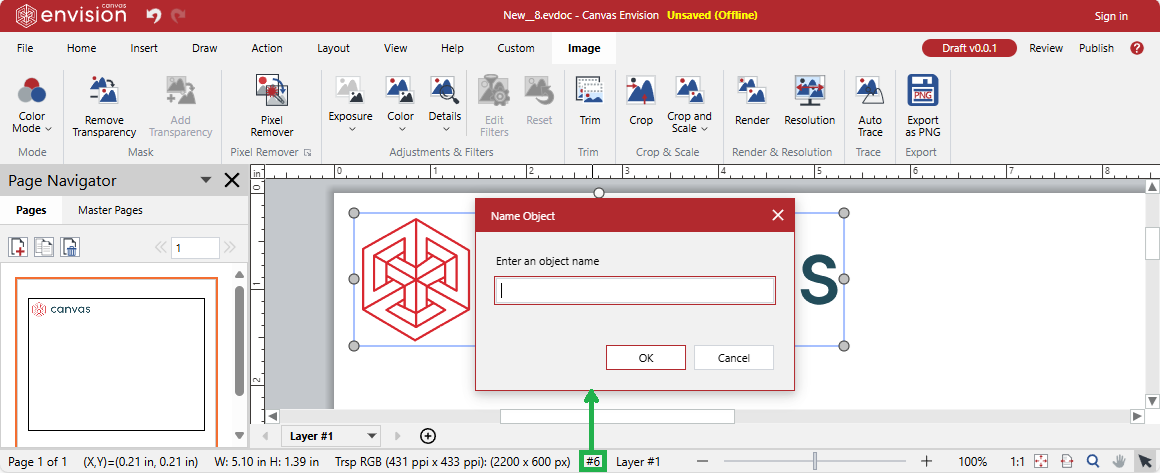
optional name: string;A string, the name of a given object item. Users can name objects in the Canvas Envision Creator application. To name an object, a user should select it and click the object ID on the Status bar below the main working area. Object names must be unique, but objects can be duplicated.
Object identifiers
You can identify an object item with one of the following object item data object properties:
idname
Model items
A model item is a JS or TS object of the "model" (EvItemType.Model) item type.
Model item TS blueprint
Model item JS blueprint
- { item: EvItemType.Model, data: EvModelItemData }
- { item: "model", data: { id: 12345678 } }
EvModelItemData interface
The EvModelItemData TS interface defines a blueprint of a model item data object kept in the data property of a model item object. A model item data object has the following properties:
optional id: EvObjId;A number, the dynamic internal ID of a given model item unique in the current document session. This ID is not globally unique across different sessions of the same document and should not be stored outside the context of the current document session.
optional name: string;A string, the name of a given model item.
Model identifiers
You can identify a model item with one of the following model item data object properties:
idname
Part items
A part item is a JS or TS object of the "part" (EvItemType.Part) item type.
Part item TS blueprint
Part item JS blueprint
- { item: EvItemType.Part, data: EvPartItemData }
- { item: "part", data: { metaValue: { field: "metadata field", value: "metadata value" }, model?: { id = "model item's ID" } } }
EvPartItemData interface
The EvPartItemData TS interface defines a blueprint of a part item data object kept in the data property of a part item object. A part item data object has the following properties:
optional partId: EvPartId;A string, the persistent internal UUID of a given part item. The UUID is globally unique across documents and sessions and can be stored outside the context of the current document session. It can be queried with the
GetPartInfo(part: EvItem, options?: EvPartQueryOptions): Promise<Ev3DObjectData>andGetModelInfo(model?: EvItem, options?: EvPartQueryOptions): Promise<Ev3DObjectData>functions for parent parts and the entire model.optional model: EvItem;A model item to which a given part item belongs. This property is necessary only when the model of the part is needed. If it is not specified, the part is assumed to belong to the model currently displayed in 3D mode. The model must be specified for 3D edit API calls outside 3D mode.
optional metaValue: EvMetaValue;Metadata of a given part item type provided as a JS or TS object of the
EvMetaValuetype. The evCreate API supports part identification with the part metadata instead of the part ID.
EvMetaValue interface
The EvMetaValue TS interface defines a blueprint of a part item metadata object kept in the metaValue? property of a part item data object. A part item metadata object has the following properties:
field: string;A string, the name of a metadata field.
value: string;A string, the value of a metadata field.
optional group: string;A string, the name of a group of metadata fields.
Part identifiers
You can identify a part item with one of the following part item data object properties:
partIdmetaValue
Animation items
An animation item is a JS or TS object of the "animation" (EvItemType.Animation) item type.
Animation item TS blueprint
Animation item JS blueprint
- { item: EvItemType.Animation, data: EvAnimationItemData }
- { item: "animation", data: { id: 12345678 } }
EvAnimationItemData interface
The EvAnimationItemData TS interface defines a blueprint of an animation item data object kept in the data property of an animation item object. An animation item data object has the following properties:
optional id: EvObjId;A number, the dynamic internal ID of a given animation item unique in the current document session. This ID is not globally unique across different sessions of the same document and should not be stored outside the context of the current document session.
optional name: string;A string, the name of a given animation item.
Animation identifiers
You can identify an animation item with one of the following animation item data object properties:
idname