SetViewAbsolute Function
Controls the positioning behavior of the magnified area of a given lens item from an Envision document currently opened in the Canvas Envision Creator app when the lens frame of the given lens item is moved to a new position.
Parameters
lensObj: EvItemAn Object item object, a lens item from the Envision document currently opened in the Canvas Envision Creator app whose magnified area position behavior should be changed.
If a given object item is not a lens, the function throws an error.
absolute: booleanA Boolean, a switch to determine the behavior of the magnified area position when the lens frame is moved to a new position on the page:
true: absolute—the magnified area stays at the same position.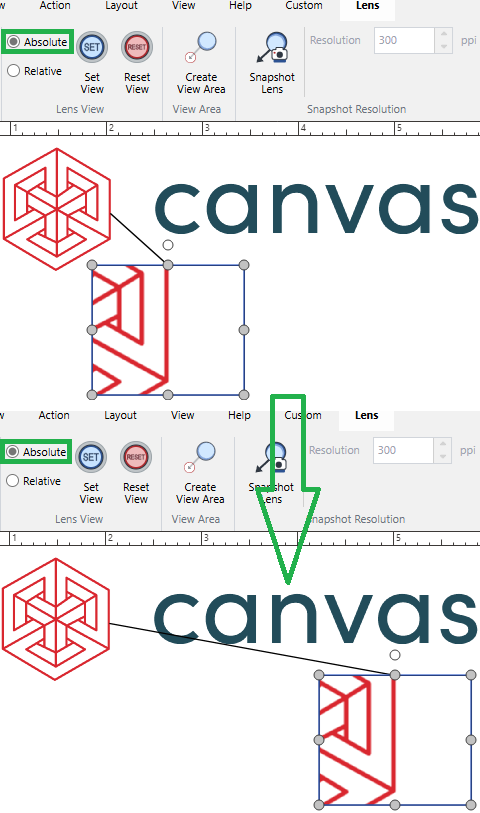
false: relative—the magnified area is moved to a new position relative to the new position of the lens frame, but the starting point position of the leader line remains the same.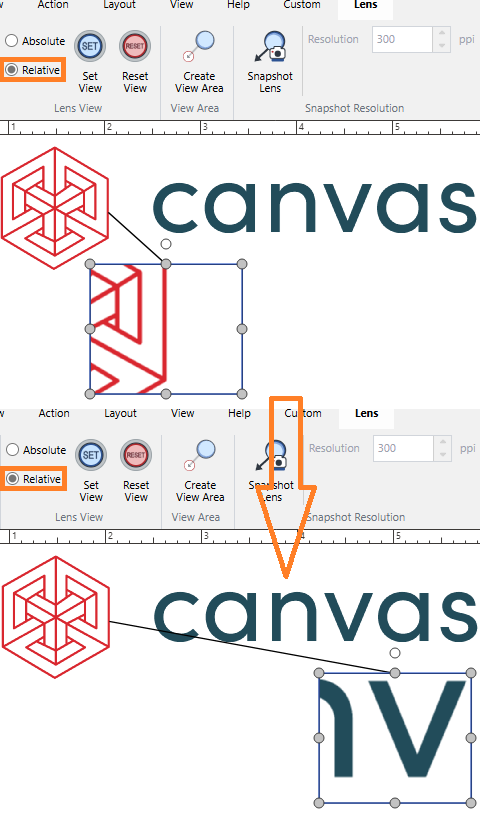
Return value
Promise<void>A Promise that, if fulfilled, resolves to
voidif the positioning behavior of the magnified area of the given lens item in the current document has been successfully changed.