SetPinwheelAngle Function
Changes the pinwheel parameter of a given multigon item from an Envision document currently opened in the Canvas Envision Creator app to a given new angle.
Parameters
obj: EvItemAn Object item object, a multigon item from the Envision document currently opened in the Canvas Envision Creator app whose pinwheel parameter should be set to the given new angle.
If a given object item is not a multigon, the function throws an error.
If a given multigon item does not support the pinwheel parameter, the function is executed without effect.
angle: numberA number, a given new pinwheel angle of the given multigon that controls the rotation of the outer points (vertices) of a Star or Star Outline multigon from their original position around the multigon center, affecting the overall appearance of the shape. The inner points stay at their original position during rotation.
This parameter is not available for the Frame, Spoke, and Wheel multigons.
The valid range is from
-360to360. Positive numbers rotate the points in question clockwise, and negative numbers rotate them counterclockwise.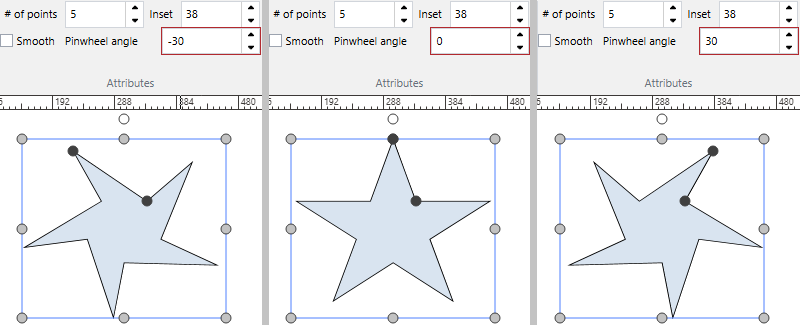
Return value
Promise<void>A Promise that, if fulfilled, resolves to
voidif the pinwheel parameter of the given multigon item in the current document has been successfully set to the given new angle.