Create Function
Creates a new table item with a given number of rows and columns in a given bounding box, either empty or prepopulated with given content and formatting, in an Envision document currently opened in the Canvas Envision Creator app.
Parameters
rows: numberA number, the number of rows the new table item should have.
columns: numberA number, the number of columns the new table item should have.
bounds: EvRectAn
EvRectobject, the position and size of the bounding box of the new table item. The bounding box size defines the dimensions of the table rows and columns.zOrder?: EvObjectZOrderAn
EvObjectZOrderobject that includes:The layer item object of a layer in the current document where the new table item should be added. The default value is the current layer on the current page.
The position of the new table item in the stack of object items on the given layer. It is a zero-based index that is
0for the topmost object item on the layer and increases by1for each following object item going down the stack. The default value is0.
cellTexts?: string[]An array of strings, the text that should be contained in each cell of the new table item in row-major order: when it comes to the last cell in a row, it continues from the first cell in the next row.
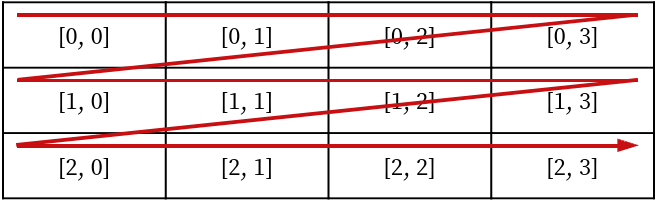
The default value is empty cells.
font?: EvFontStyleAn
EvFontStyleobject, a custom text formatting that should be applied to the text contained in the new table item.If Markdown formatting is included in a cell text, it is applied to this text after the custom text formatting has been applied.
withMarkdown?: booleanA Boolean, a flag to indicate whether the given cell texts include (
true) or do not include (false) Markdown formatting.The default value is
false.