SetCellRangeText Function
Replaces the contents of the cells given as a continuous range in a given table item from an Envision document currently opened in the Canvas Envision Creator app with given new text contents and Markdown formatting.
Parameters
tableObj: EvItemAn Object item object, a table item from the Envision document currently opened in the Canvas Envision Creator app that includes the given continuous range of cells whose contents should be replaced.
If a given object item is not a table, the function throws an error.
cells: EvTableCellRangeAn
EvTableCellRangeobject, a given continuous range of cells in the given table item whose contents should be replaced.texts: string[]An array of strings, given new texts that should replace the contents of cells within the given continuous range in row-major order: when it comes to the last cell in a row, it continues from the first cell in the next row.
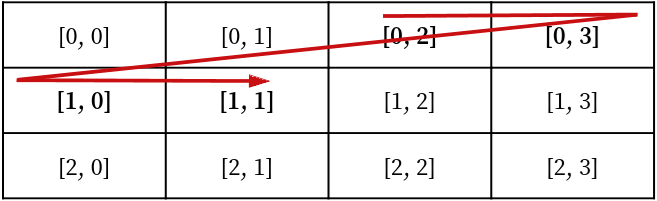
withMarkdown?: booleanA Boolean, a flag to indicate whether the given new text contents include (
true) or do not include (false) Markdown formatting.The default value is
false.
Return value
Promise<void>A Promise that, if fulfilled, resolves to
voidif the given new text contents have successfully replaced the existing contents of the cells within the given range in the given table item from the current document.